How to Integrate SSO (Single Sign On)
Product: Muvi One (Classic)
Introduction
SSO or Single Sign-On Authentication offers your users a unified authentication experience when they browse through either your applications and/or third-party apps. Once your users log into any one of the applications by using their user ID and password, they don’t have to enter their login credentials again and again to access other applications. They will be automatically logged into all the applications irrespective of the domain, technology, or platform. SSO is helpful for monitoring your customers’ accounts as well as logging their activities on the back end. Moreover, SSO also provides better security, decreasing the chances of potential attacks.
Types of SSO Integration
There are 3 ways how SSO can be integrated into your existing platform.
- JWT Token
- Muvi supported IDP (Identity Provider).
- 3rd Party IDP (New Integration)
- JWT Token
It’s a custom integration with Muvi as IDP & vice versa. If you have your own website (Built using WordPress or any other technologies) and want to use SSO between both applications, then Muvi has a ready-made solution available in the form of JWT Token (Jason Web tokens). JWTs are encrypted tokens used for passing.
Workflow of JWT Token Integration
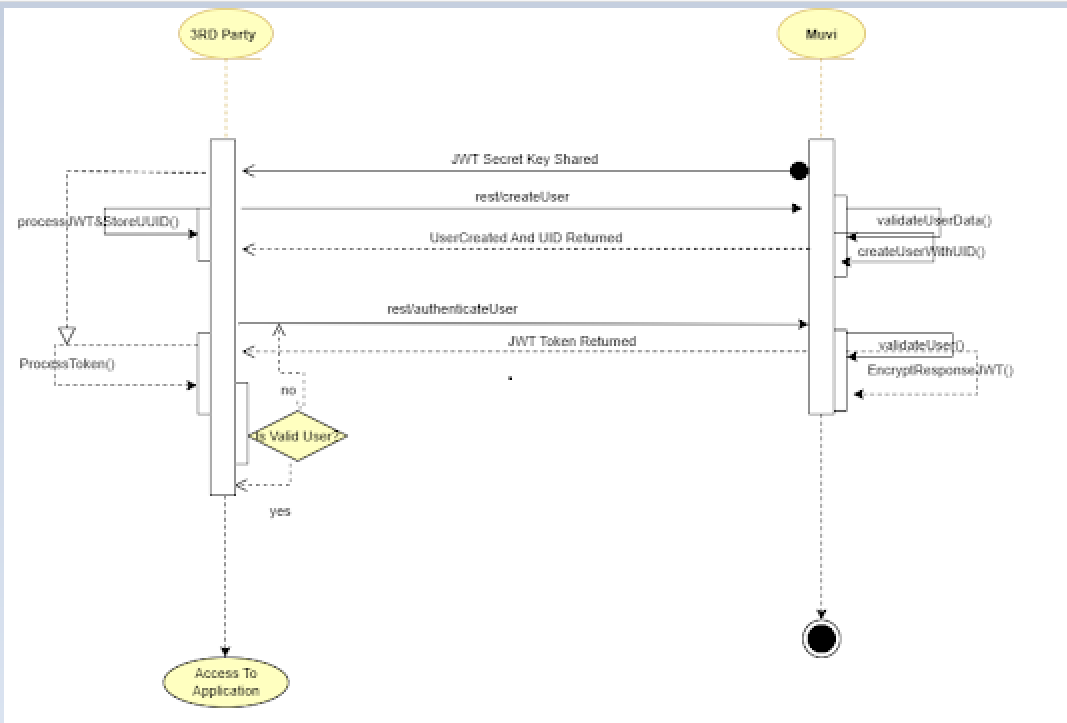
- A common JWT secret needs to be agreed upon & shared with the 3rd Party. This secret key would be used to decrypt the JWT Token.
- Using Muvi Register API and user can be created at Muvi & UID mapped to the user returned to the 3rd party service provider.
- The same UID is returned & 3rd party service provider keeps this in their DB for future usage.
- 3rd party can initiate a login API call to Muvi providing the credentials.
- Muvi validates the credentials & returns the response as a JWT Token.
- a 3rd party service provider has to process the JWT Token & take action based on the token response.
API Details
- Register User API (To register from Third Party Website)
- Get User UUID API (Already registered user UUID when required can be fetched)
- Auto Login (To auto-login to Muvi One from Third Party Website) secret information between two systems.
- Register User API
You need to use this API to register each user on a Third Party Website to the Muvi Store.
| API: | https://<MUVI_STORE_DOMAIN>/en/rest/RegisterUser?name=<USER_FULL_NAME>&authToken=<STORE_AUTH_TOKEN>&email=<USER_EMAIL_ADDRESS> |
| Method: | POST |
| Parameter: | authToken* - Muvi Store Auth Token (Will be found at Settings > Advanced)
email* - email address to register the user name - full name of the user to be registered |
| Success: | {
"code": 200, "status": "OK", "msg": "Register Success", "email": "<USER_EMAIL_ADDRESS>", "name": "<USER_FULL_NAME>", "user_uuid" : "<USER_UUID>" } |
| Failure: | {
"code": 417, "status": "Failed", "msg": "A valid email or name required!" } |
| Error Code: | 407- Oauth Token required!
408- Invalid Oauth Token! 421- Error in registration. 417- A valid email or name is required! 422- This email id already exists! |
- Get User UUID API
This API can be used in Third Party Websites to fetch User UUID when required.
| API: | https://<MUVI_STORE_DOMAIN>/en/rest/GetUserUuid |
| Method: | POST |
| Parameter: | authToken* - Muvi Store Auth Token (Will be found at Settings > Advanced)
email*- email address whose user uuid needs to be fetched |
| Success: | {
"code": 200, "status": "OK", "msg": "Success", "user_uuid": "<USER_UUID>" } |
| Failure: | {
"code": 682, "status": "Failure", "msg": "No data found." } |
| Error Code: | 682- No data found
757- Email required. 408- Invalid authToken |
Auto Login
| Link/URL: | https://<MUVI_STORE_DOMAIN>/en/user/Thirdpartylogin?access_token=<JWT_TOKEN> |
| Method: | GET |
| Example: | https://<MUVI_STORE_DOMAIN>/en/user/Thirdpartylogin?access_token=eyJhbGciOiJIUzI1NiIsInR5cCI6IkpXVCJ9.W3siaXNzdWVyX2NsYWltIjoibG9jYWxob3N0IiwiYXVkaWVuY2VfY2xhaW0iOiJlbmR1c2VyIiwiaXNzdWVkYXRfY2xhaW0iOjE1MTYyMzkwMjIsImV4cGlyZV9jbGFpbSI6MTUxNjIzOTAyMiwiZGF0YSI6W3sidXNlcl91dWlkIjoiNWY1NjMxMjAyOGVjMCIsImVtYWlsIjoiY3JhbmtlbmR1c2VyMUBnbWFpbC5jb20iLCJuYW1lIjoiamdoamdnIiwicmVmZXJyZXJfdXJsIjoiaHR0cDovL211dmkuY29tL2VuL3RoaXJkcGFydHlsb2dpbiJ9XX1d.bC5bN_O34cZDYNPZ7iiDRyrGSiszMX6NQsyNfLUNey0 |
Note: The link will log in to the Muvi store and redirect to the homepage if the referrer URL is empty.
JWT Token Generation
You can generate JWT Token at your end and pass it to Auto Login Link and it will auto-login the user to the Muvi store.
Payload to create JWT Token:
{
"user_uuid": "<USER_UUID>",
"email": "<USER_EMAIL_ADDRESS>",
"name": "<USER_FULL_NAME>",
"referrer_url": "<REFERRER_URL>"
}
Algo: HS256
JWT Secret Key: A random string that will be used to encode & decode related to JWT Token. Both Third Party Website & Muvi Store need to have the same secret key. (Example: Muvi@123)
- Muvi Supported IDP
With Muvi One, you can easily enable SSO with multiple providers listed below and your customers can log in to your website quite easily.
- Comcast (SAML 2.0)
- WTVE (SAML 2.0)
- Miniorange (SAML 2.0/Oauth 2.0)
- Azure (Oauth 2.0)
- Google (Oauth 2.0)
- Apple (Oauth 2.0)
We integrate SSO using SAML 2.0 (Security Assertion Markup Language) via COMCAST, MiniOrange, and WTVE identity provider only and OAuth 2.0 via Azure, Google, and Apple. For SSO integration, first, you need to obtain the “Entity ID”, “Service Endpoint URL for Login”, “Service Endpoint URL for Logout” and “Signing Certificate” from COMCAST, MiniOrange, or WTVE. For Azure, Google, and Apple you have to obtain the "Client ID", "Client Secret", and "API End Point URL" for SSO integration. For more information, click here.
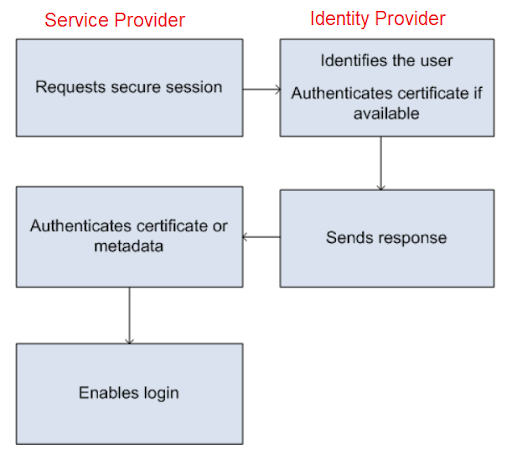
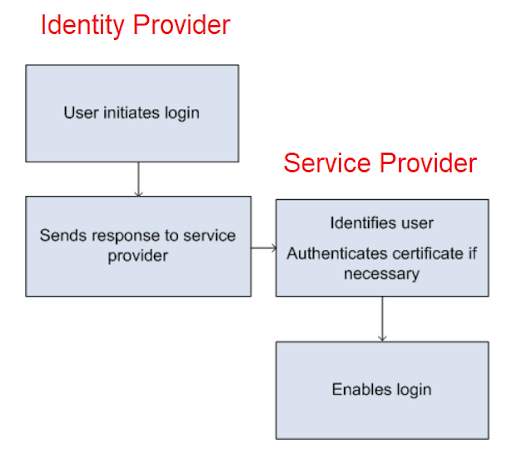
Check the below-mentioned diagram for the simple workflow illustration with IDP & Service provider.
Login Initiated by Service Provider (see the below screenshot).
Login Initiated by the IDP (see the below screenshot).
- Third-Party IDP (New Integration)
Before integrating any third-party IDP (Identity Provider), we will do a POC (Proof of Concept) regarding the integration once the POC is successful we proceed with the final integration. This is a custom integration & may require a customization fee for the same.