How We Charge for Muvi Live
Product: Muvi LivePurchasing Streaming Hours and Bandwidth
Introduction
Muvi Live offers different pricing plans that cater to various types of users, from individuals to large enterprises. The pricing structure for Muvi Live can vary based on different factors such as the subscription plans (e.g. Standard, Professional or Enterprise plan), streaming hours used (number of hours you live stream), bandwidth used (live stream viewed by the number of end-users), using additional features like Paywall, etc.
Live 14 Days Free Trial
When you start your 14 days Free Trial in Live, you have limited Bandwidth and Streaming Hours. The "Free Trial" offers 1 GB of Free Bandwidth 1 GB of Storage and 15 Minutes of Live Streaming. Your live streaming will be stopped once your free trial period is over or you have exhausted your bandwidth, or streaming hours. You need to purchase a subscription to continue live streaming.
Live Standard Plan
This is a starter plan. You can purchase the “Standard” subscription plan and get the benefits included in the plan. You can get 100 GB bandwidth, 100 GB storage, and 10 streaming hours in the plan. If you exhausted the bandwidth/storage/streaming hours, you will be charged additionally. You can also purchase the Bandwidth and Streaming hours beforehand. To estimate the required infra units, please use the Muvi Infra Calculator or consult with our team.
The available units in the Wallet will get deducted automatically based on your consumption. If the usage exceeds the units available in the Wallet, the Recurring Billing will be initiated.
Recurring Billing means you will be charged for every 100 GB of bandwidth and every 10 Streaming Hours you consume. We call this 100 GB of bandwidth and 10 Streaming Hours Recurring Billing Units (RBU).
| Note: Live streaming will be stopped, and the account will get blocked whenever the Recurring Billing fails. Recurring Billing will fail if there is no payment card added to the account or when we are unable to charge the card because of card issues. So, we recommend pre-purchasing the Bandwidth and Streaming Hours before the live stream for uninterrupted streaming. |
Live Professional Plan
You can purchase the “Professional” subscription plan and get the benefits included in the plan. You can get 500 GB bandwidth, 500 GB storage, and 50 streaming hours in the plan. If you exhausted the bandwidth/storage/streaming hours, you will be charged additionally. You can also purchase the Bandwidth and Streaming hours beforehand. To estimate the required infra units, please use the Muvi Infra Calculator or consult with our team.
The available units in the Wallet will get deducted automatically based on your consumption. If the usage exceeds the units available in the Wallet, the Recurring Billing will be initiated.
Recurring Billing means you will be charged for every 500 GB of bandwidth and every 50 Streaming Hours you consume. We call this 500 GB of bandwidth and 50 Streaming Hours Recurring Billing Units (RBU).
| Note: Live streaming will be stopped, and the account will get blocked whenever the Recurring Billing fails. Recurring Billing will fail if there is no payment card added to the account or when we are unable to charge the card because of card issues. So, we recommend pre-purchasing the Bandwidth and Streaming Hours before the live stream for uninterrupted streaming. |
Live Enterprise Plan
You can purchase the “Professional” subscription plan and get the benefits included in the plan. You can get 1 TB bandwidth, 1 TB storage, and 100 streaming hours in the plan. If you exhausted the bandwidth/storage/streaming hours, you will be charged additionally. You can also purchase the Bandwidth and Streaming hours beforehand. To estimate the required infra units, please use the Muvi Infra Calculator or consult with our team.
The available units in the Wallet will get deducted automatically based on your consumption. If the usage exceeds the units available in the Wallet, the Recurring Billing will be initiated.
Recurring Billing means you will be charged for every 1 TB of bandwidth and every 100 Streaming Hours you consume. We call this 1 TB of bandwidth and 100 Streaming Hours Recurring Billing Units (RBU).
Note:
|
Charges for Streaming Hours
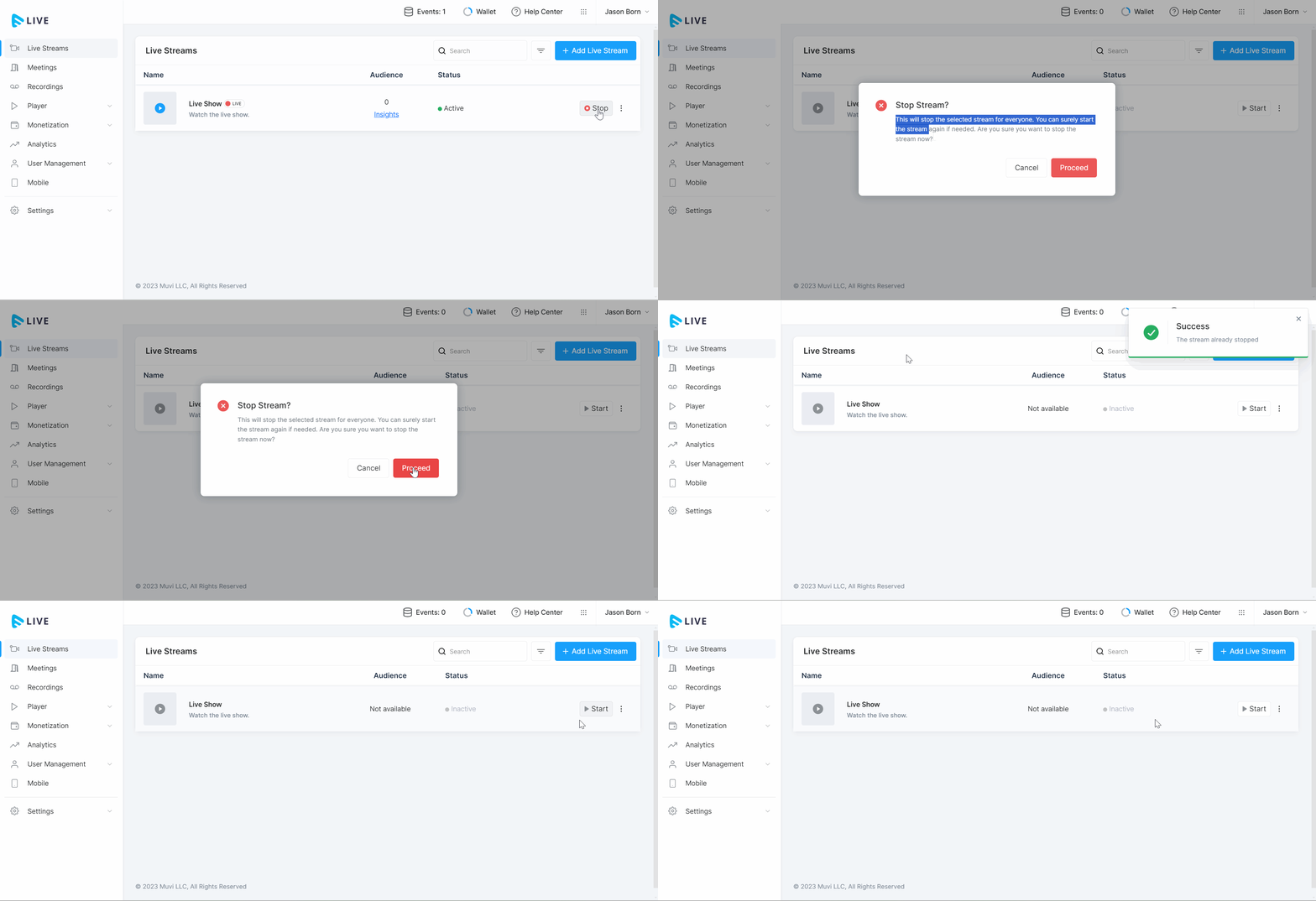
When you start the live stream, your streaming hours will start and when you stop the live stream, the streaming hours will be stopped (see the below GIF).
Even though you have stopped the live stream from the encoder (i.e., OBS, vMix, etc.) if your live stream is still "on" in Muvi Live (server), you will also be charged for this. So, you need to stop the live stream from Muvi Live (server) once you finished streaming. The stream hours are charged on a per-hour basis.
This is a variable infra component. It's $1 per hour of streaming for streaming. For example, if you run a 2-hour live streaming, it will be $2. If you run 2 simultaneous live streaming for 2 hours, it will be $4, and so on.
| Note: Our system will automatically send an email notification to your registered email address if the live-streaming server is idle (i.e., no feed is received or sent via the server for a continuous period of six hours). If the server is not terminated after 24 hours, it will send again. |
Charges for Bandwidth
Bandwidth refers to the maximum rate of data transfer across a network, typically measured in megabits per second (Mbps). For live streaming, sufficient bandwidth is essential to ensure smooth, high-quality video and audio transmission.
When your end users watch the live stream, you will be charged for the bandwidth consumed by the end users. It is charged on a per GB (Gigabyte) basis. This variable infra component depends on various factors like the internet speed, video quality, number of users, the device used to watch the live stream, etc.
Purchasing Streaming Hours and Bandwidth
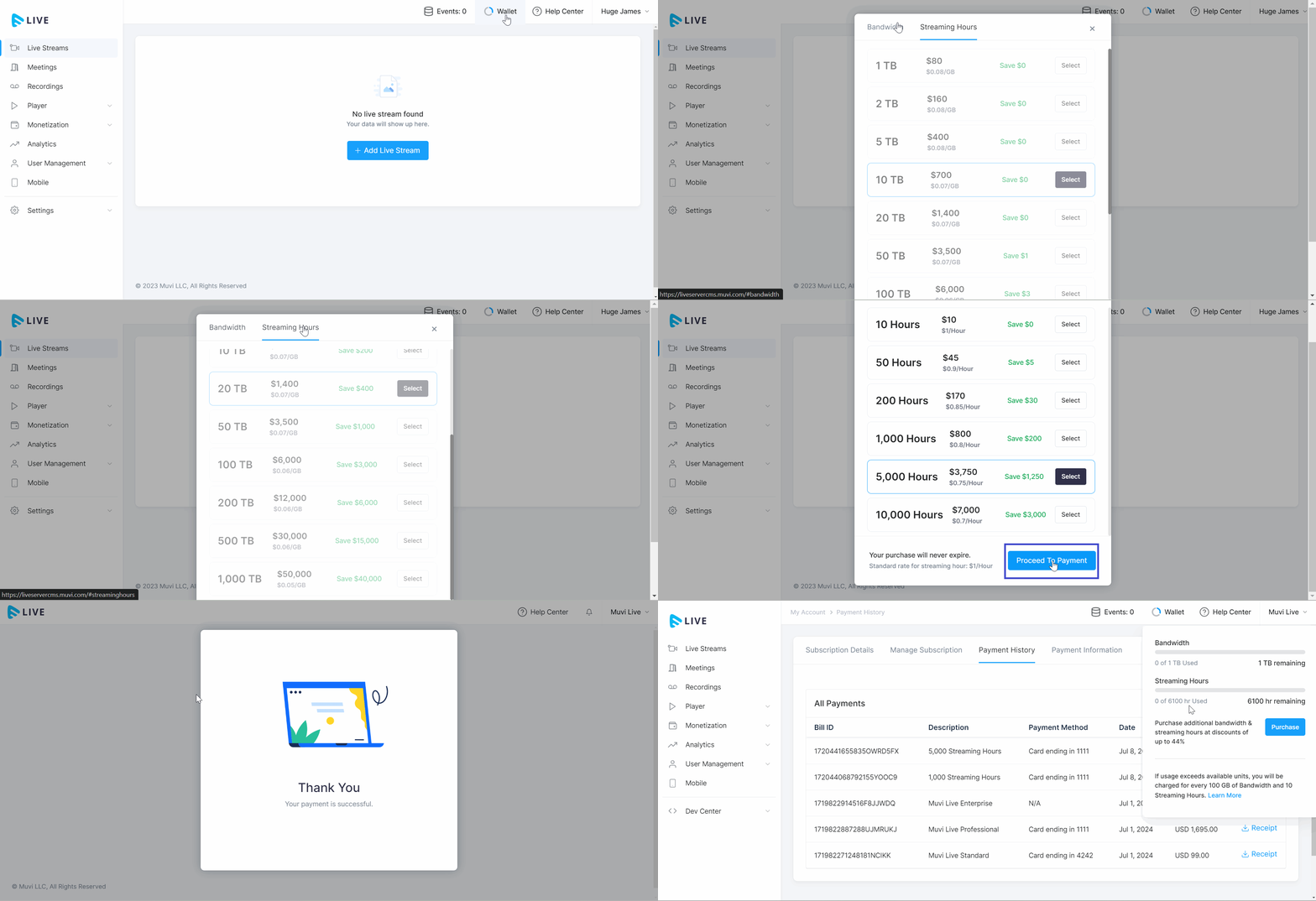
You can purchase additional Streaming Hours and Bandwidth from the Muvi Live CMS. Before purchasing, you can check your current Streaming Hours and Bandwidth under the “Wallet”.
- To purchase Streaming Hours and Bandwidth, click on “Wallet” in the Live CMS.
- You can view your available Streaming Hours and Bandwidth.
- Click on “Purchase” to purchase additional streaming hours and bandwidth.
- Click on the "Bandwidth" tab to purchase bandwidth.
- Select “Bandwidth” from the list (e.g., 10 TB, 100 TB, 500 TB, etc.) and click on “Proceed to Payment”.
- Provide your Credit Card details and click on “Pay Now”.
- You can view the confirmation of purchase.
- The purchase details can be found under the “Payment History”.
- To purchase the additional streaming hours, click on the “Streaming Hours” tab.
- Select “Streaming Hours” from the list (e.g., 10 Hours, 100 Hours, 500 Hours, etc.) and click on “Proceed to Payment”.
- Provide your Credit Card details and click on “Pay Now”.
- You can view the confirmation of purchase.
- The purchase details can be found under the “Payment History”.
- Click on “Wallet” to view the purchased “Streaming Hours” and/or, “Bandwidth”. The purchased bandwidth and/or streaming hours will be added to your existing bandwidth and/or streaming hours in the wallet.
| Note: You cannot purchase additional bandwidth and/or, streaming hours during the Free Trial. You need to purchase a subscription plan to purchase the additional bandwidth and/or, storage. |
Charges for Using Paywall
Muvi Live’s Paywall feature allows you to easily monetize your live streaming. You can monetize your live streaming using the Pay Per View monetization method. There are charges you need to pay to use Paywall to monetize your live streaming. To learn how to monetize your live streaming using Paywall click here.
- Muvi charges a flat 9% commission as a platform fee.
- Bandwidth and Streaming Hours will be charged as Infra Fees.
- Additionally, depending on your location, you may incur standard payment processing, currency conversion, and payout fees where applicable.
- Our payment gateway partner Stripe Connect fees are mentioned on the Stripe Regional Payments pricing (Please ensure the webpage shows the same country you choose for the Stripe Connect setup. The webpage country can be changed from the footer).
- For Stripe Connect, there are no withdrawal/payout fees.