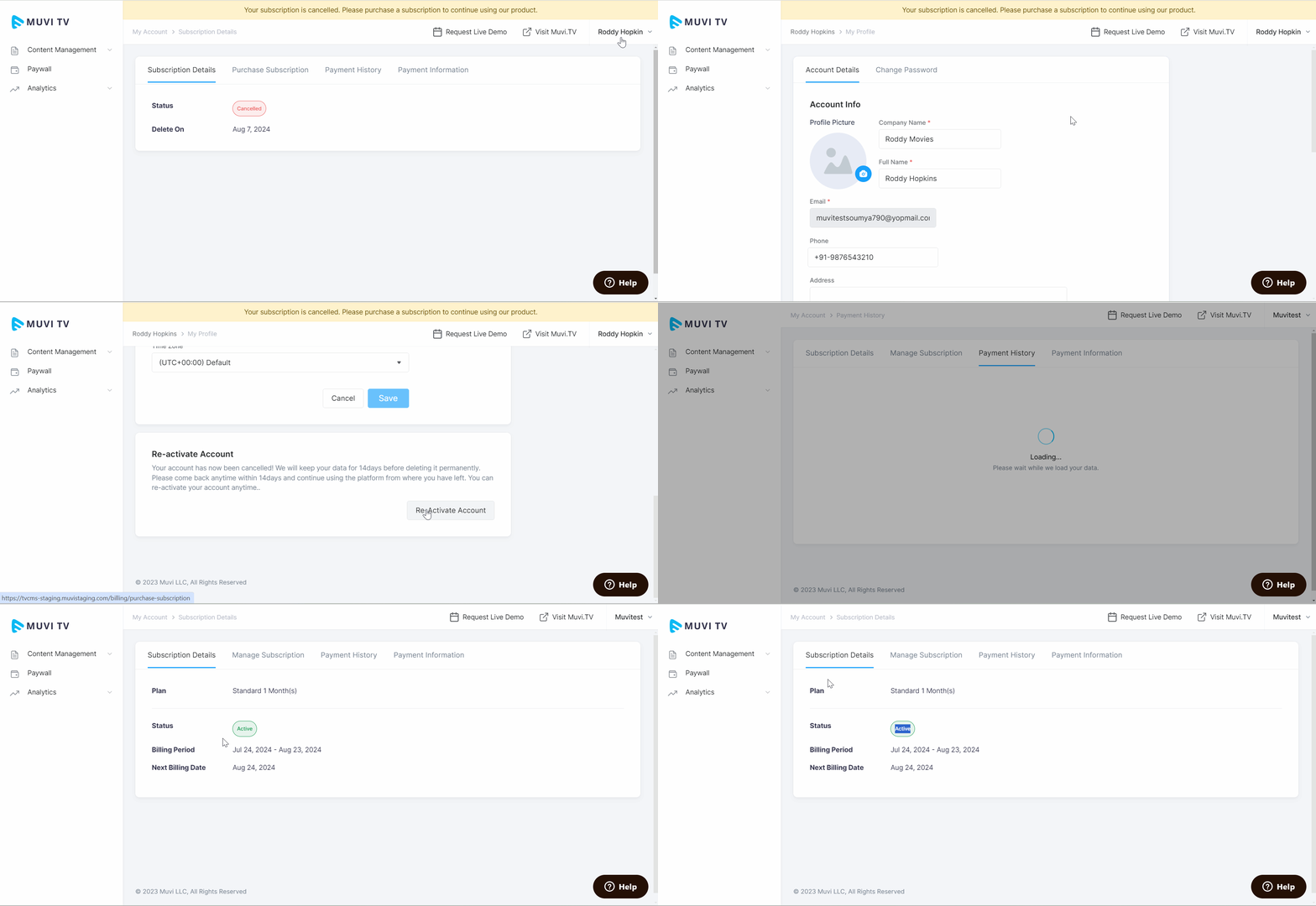
How to Re-Activate Your Muvi TV Subscription Product: Muvi TV Introduction Re-Activating Muvi TV Subscription Introduction You can re-activate your Muvi TV Subscription from the CMS. You must purchase the subscription again to re-activate your account. Re-Activating Muvi TV Subscription To re-activate your account, click on “My Profile” in the CMS. Click on the “Account Details” tab. Scroll down to “Re-Activate Account”. Click on “Re-Activate Account”. The subscription plan is selected by default. Under “Select Term”, select the term of the subscription plan (e.g., Monthly, Half-Yearly, Yearly). Click on “Proceed to Checkout”. Provide your Card details and billing address. Click on “Pay Now”. You will get confirmation regarding your subscription purchase. You can view your account status is “Active” in the “Subscription Details” page (navigate to My Account àSubscription Details in the CMS).