• Products
      • Products

        Build Streaming Platforms like Netflix, Udemy or Audible

        Live stream events, shows, tournaments on any device

        Host, publish, manage video, and audio files in one place

        Cloud playout software for linear TV & FAST channels

        New

        Video compliance checks and fixes with AI

        New

        Host branded video meetings on your platform

        Sell your individual videos online with pay-per-view instantly

        SDKs to deliver cutting-edge video, efficiently and on any device

        Alie AI Header

        Alie AI - World's First Streaming Focused AI Engine

        • ExamplesRight Arrow
        • Alie AI DemoRight Arrow
        • Ask SalesRight Arrow
        • Switch to MuviRight Arrow
    • Alie AI
        • Alie AI
          Built on Alie

          Video compliance checks and fixes with AI.

          World’s First Streaming Focused AI Engine
          Discover Alie
          AI Subtitles

          Auto‑generate video subtitles in primary language.

          AI Translations

          Translate subtitles instantly in 75+ languages.

          AI Recommendations

          Deliver tailored content recommendations.

          AI Metadata

          Smart fill meta titles, descriptions, tags & casts.

          AI Compliance

          Automate regulation checks and edits in one click.

          AI Dubbing

          Dub videos into languages your customers speak.

          AI Chaptering

          Split long videos & audio files into structured chapters.

          AI Clips

          Create clips, reels, social snippets and more in one click.

          AI Chat with Video

          Chat with videos to ask questions, brainstorm & more.

          View all AI FeaturesRight Arrow
          Demo Center
          Menu Image

          Experience Muvi products first hand by taking a quick demo.

          Learn moreRight Arrow
    • Pricing
    • Solutions
        • Solutions
          • Video Streaming (VOD)
          • Audio Streaming (AOD)
          • Live Streaming
          • Offline Streaming
          • Video Hosting Platform
          • Podcast Platform
          • Mobile & TV Apps
          • Meetings & Webinars
          • Online Video Platform
          • IPTV Solution
          • Live Events
          • Media & Entertainment
          • Sports
          • Healthcare
          • Health & Fitness
          • Tourism & Hospitality
          • Education
          • Religion
          • Judiciary
          • Enterprises
          • Film Festivals
          • Broadcasters
          • Government
          • Telcos
          • Finance
          • Beauty
          Web App
          • Website
          Casting
          • Chromecast
          • AirPlay
          • Apple Watch
          Mobile
          • iOS
          • Android
          • Mobile SDKs
          Others
          • Get Only Apps
          • Muvi Onyx
          • Muvi Blue
          TV
          • Roku TV
          • Android TV
          • Apple TV
          • Samsung TV
          • Fire TV
          • LG TV
          • VEWD TV
          • VIDAA OS TV
          • Astro TV
          • Netflix
          • YouTube
          • ESPN+
          • Udemy
          • Audible
          • Apple Music
          • Zoom Meetings
          • AVO TV
          • Calm
          • Shahid
          • Nebula
          • Pluto TV
          • beIN
          • Poppo Live
          • Rumble
          • TikTok
          • Reelshort
          • OnlyFans
          • Clubhouse
          • Clipclaps
          • Google Podcast
          • Fanhouse
          • OnlyFans TV
          • Spotify
          • Bigo Live
          • Whatnot
          • Hulu
          • Tango
          • Equinox
          • Cerebral
          • Masterclass
          • Twitch
          • Curiosity Stream
          • WorldStarHipHop
          • Baller TV
          • TinyZone
          • BXNG
          • Dramabox
          • Boomplay
          • Blinkist
          • Seekho
          • UpScrolled
          • Featured Solutions
          • On-premise
          • Short Videos
          • eLearning
          • FAST
    • Help
        • Help
          Help & Support
          • Help Center
          • Community
          • Support Plans
          • Wiki
          • Migrate to Muvi
          Services
          • CMS Management
          • End-User Support
          • Design & Visuals
          • Product & UX Consulting
          • Professional Services
          • Critical Events Support
          Resources
          • Resource Center
          • Blogs
          • Events & Webinars
          • Case Studies
          • Product Updates
          • Free Tools
          Developers
          • APIs
          • SDKs
          • BYOD
          • Webhook
    • Company
        • Company
          Company
          • About Us
          • Newsroom
          • Compliances
          • Awards & Recognition
          • Muvi Academy
          • Contact Us
          • Ask Sales
          Partners
          • Partnership Program
          • Partner Portal Login
          • Find a Partner
          • Integrations
          • Become a Partner
          • Affiliate Program
          CareersRight Arrow
          Muvi Foundation
          Menu Image

          An inspiration, to strengthen, to help, to empower our entire community.

          Learn moreRight Arrow
    Login
    Free Trial
     
    Create a ticket
    Help Articles Player Adding Player Logo
    Table of Content
    • Introduction
    • How to Add Player Logo
    • Changing Logo Position
    • Adding Redirect URL to Logo
    Share Link

    Adding Player Logo

    Introduction

    You can add “Logo” to your video player. Your subscribers/viewers can see the logo on the video player when they watch any video content on your online video platform. You can change the position of the logo as per your desire and also add a redirect URL to the logo. If you want to see how the logo appears on the player, then you can test it in our demo player without taking a free trial.

    How to Add Player Logo

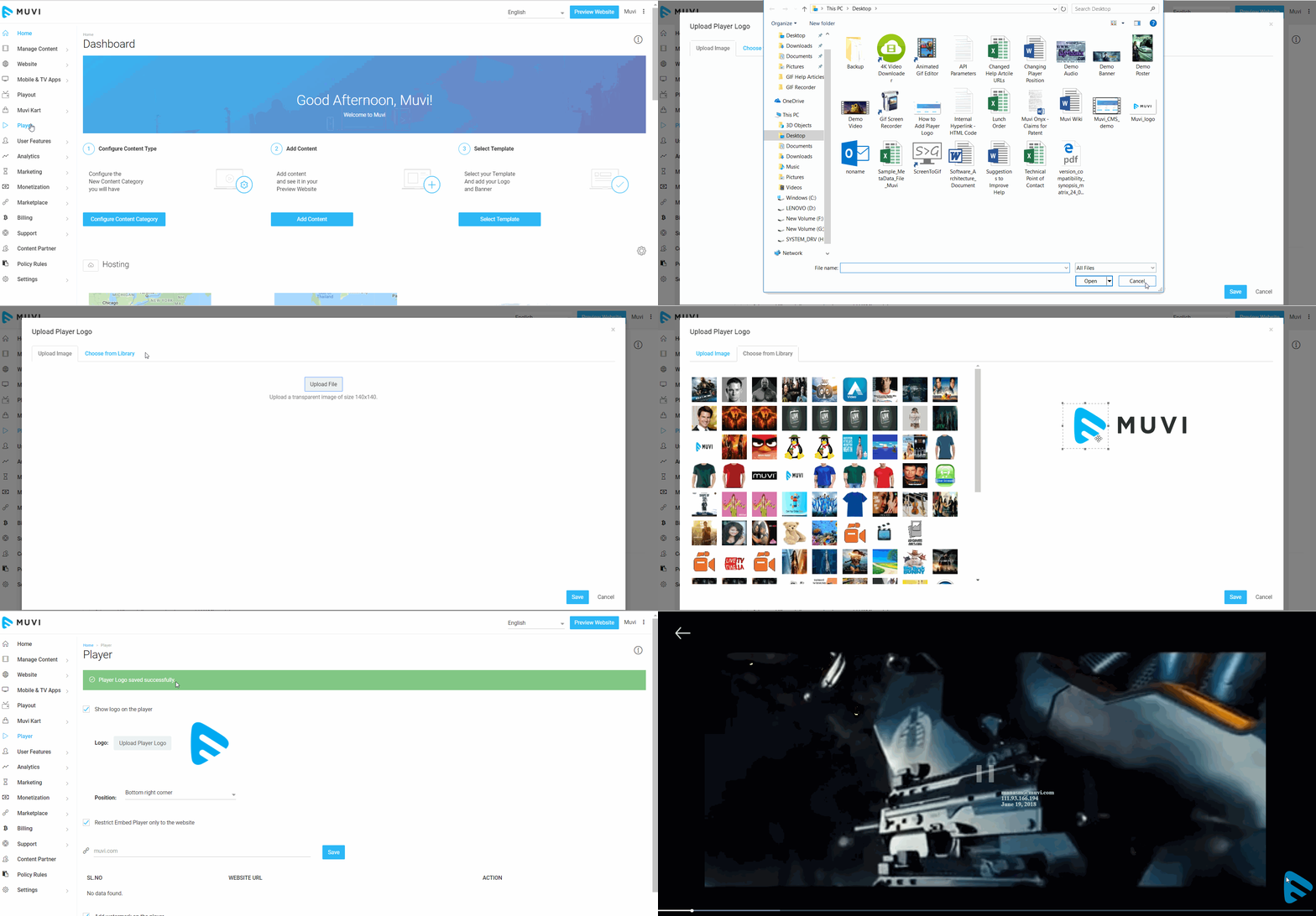
    • Click on “Player” in your CMS. Then, on the player page, select the checkbox "Show logo on the player"
    • Click on "Upload Player Logo".
    • To upload the image from your computer, click on "Upload File"
    • Or you can select the image from the Image Library.
    • After selecting the image, resize it. Then, click on "Save"
    • Play a video on your website. You will see the logo on the bottom right corner of the player.

    Note: The player logo doesn't appear on the third-party players. So, if you have embedded any third-party video (e.g. YouTube, Daily Motion, etc.) to any content, the logo will not appear on the player when end-users play the content. It will only display the third-party logo (e.g. YouTube, Daily Motion, etc.).

    Changing Logo Position

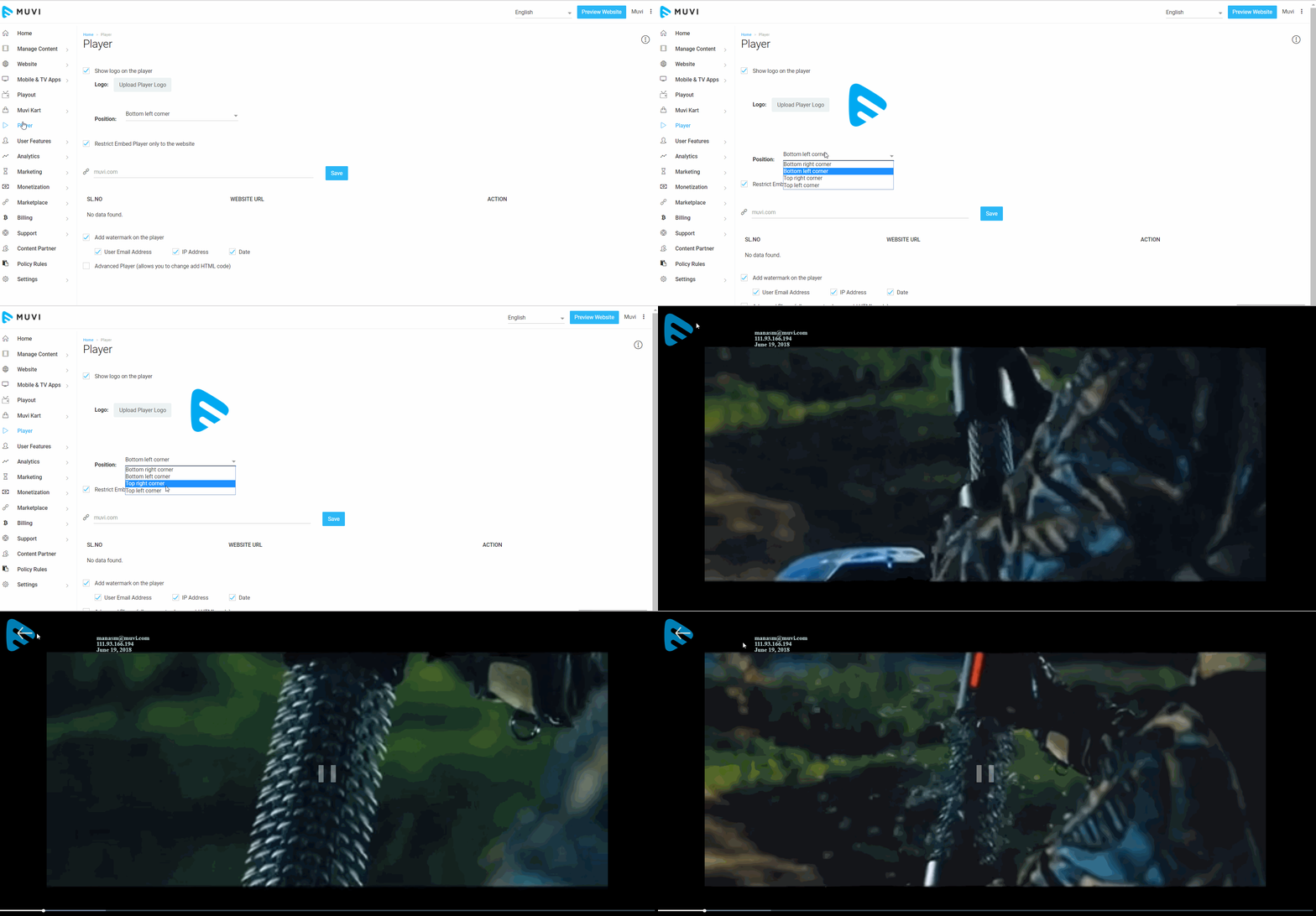
    By default the logo appears on the bottom right corner of the player. As per your preference you can change the position of the logo.

    • Click on "Player" in your CMS
    • Select the position from the drop-down
    • The logo will appear on the selected position of the player when users play any content

    Adding Redirect URL to Logo

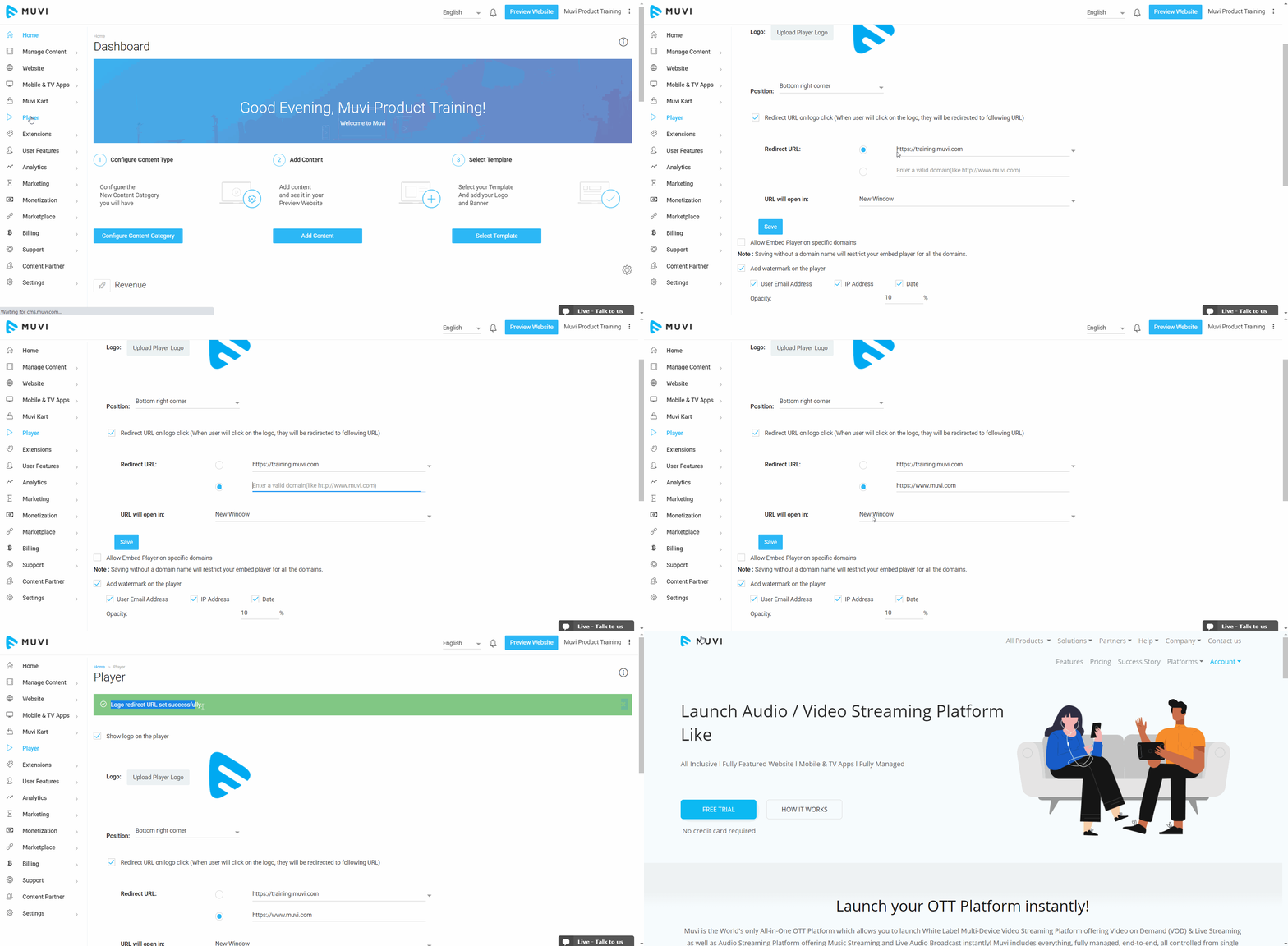
    You can add a redirect URL to your logo. When the end-users will click on the logo, either they will get redirected to your own domain or to any other website. You can also select the option of whether the website will open in the same tab or on a new tab. To add a redirect URL, first, you need to enable this option in the CMS.

    • Click on "Player" in the CMS.
    • To enable the redirect URL, select the option "Redirect URL on logo click".
    • In the "Redirect URL", your domain URL is selected by default. You can also select the option to add a different URL. Then you need to type the URL.
    • Select the option from the drop-down "New Window", if you want the site to open in a new window, else select the option "Same Window", if you want the site to be opened in the same window.
    • Click on "Save" to save the settings.
    • When the end-users will click on the logo, they will get redirected to the URL you have selected.
    Was this article helpful?
    Yes
    No
    Let us know so that we can improve.

    Your email address will not be published. Required fields are marked *

    Ask the Community

    Our super friendly community helpers are on hand to help out ask away. They can help with almost anything.

    Products

    • One
    • Live
    • Flex
    • Playout
    • TrueComply
    • Muvi Meet
    • TV
    • Player

    Products

    • One
    • Live
    • Flex
    • Playout
    • TrueComply
    • Muvi Meet
    • TV
    • Player

    Company

    • About Muvi
    • Careers
    • Partner Program
    • Find a Partner
    • Awards & Recognition
    • Wall of Love
    • Global Compliances
    • Legal Policies
    • Muvi Foundation
    • Muvi University
    • Contact Us
    • Ask Sales
    Solutions
    • OTT Platform
    • Short Video Platform
    • Video on Demand
    • Academy
    • Live Streaming Platform
    • Video Hosting Platform
    • Online Video Platform
    • FAST Channels

    Apps

    • Web
    • Android
    • iOS
    • Apple TV
    • Google TV
    • Samsung TV
    • LG TV
    • Amazon Fire TV
    • Roku TV
    • VIDAA OS

    Resources

    • Blogs
    • Events & Webinars
    • Whitepapers
    • Case Studies
    • Free Tools
    • Switch to Muvi

    Help and Support

    • Help Center
    • Community
    • Support Service
    • Release Notes
    • Video Portal

    Developers

    • APIs
    • SDKs
    • BYOD
    • Webhook
    • Integrations
    Developers
    • APIs
    • SDKs
    • BYOD
    • Webhook
    • Integrations
    • 42241 Violet Mist Terrace, Ashburn, VA 20148
    • sales@muvi.com
    • +1-860-973-0083 (USA)

    Copyright ©2026 Muvi LLC | Leading the streaming revolution since 2010